

Find prospects that match your ICP
When a Campaign starts, DealMax uses LinkedIn Sales Navigator advanced search to filter prospects against your ICP:- Industry, title, company size, region, and other ICP filters
- Automatic deduplication (by default, up to 3 contacts per company at once)
- Skips prospects already contacted or already in your network
Send connection requests
DealMax sends personalized connection requests within your daily limits:- Each note is personalized from the prospect’s public LinkedIn profile
- Sends are distributed randomly within your Account Running Time windows to mimic natural activity
- Lead status becomes Pending after a request is sent
Automated follow-up sequence
After a connection is accepted, DealMax runs the follow-up sequence. Each message is personalized by Max from the prospect’s profile and activity—grounded in their context, not generic marketing copy. While the sequence is running, the lead is typically in Connected.Max-assisted replies
When a prospect replies:- The lead appears in Needs Action with a highlight in Accounts & Leads
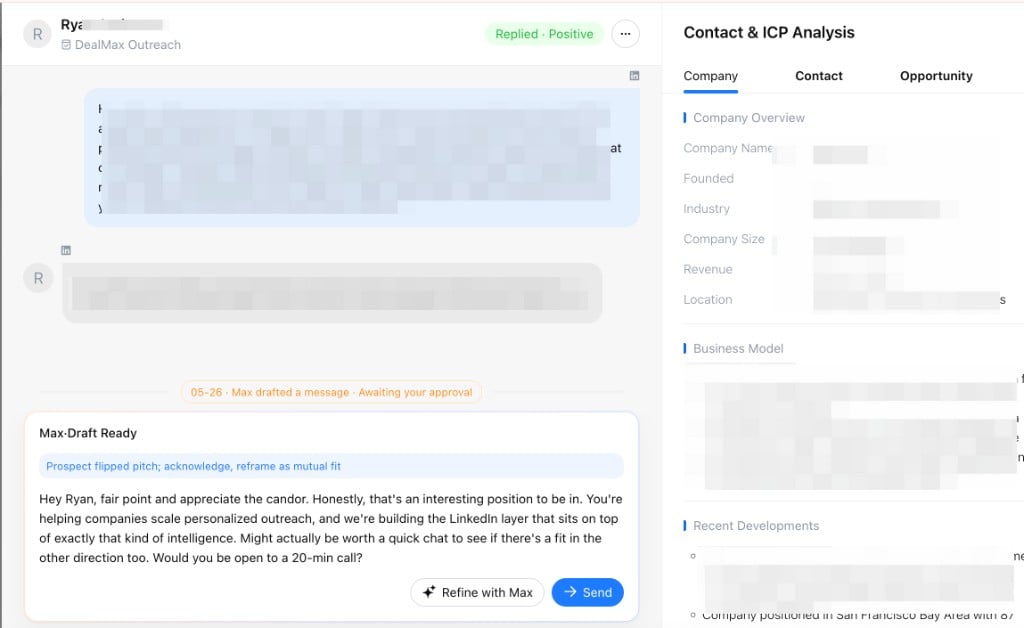
- Max analyzes the reply and drafts a response
- Each draft includes a short strategy note; you can send as-is, edit, or reply manually
Manual takeover and follow-up
When a prospect replies, the lead moves to Needs Action. Follow up promptly so opportunities do not stall.1
Open lead details
In Needs Action, click the contact to view the full thread and their latest reply.
2
Review Max’s draft
Max drafts a reply for each inbound message. Send it as-is, or tell Max how to adjust—more direct tone, emphasize a specific value point, or try a different angle—until you are satisfied.
3
Send the message
When the copy looks right, click Send. The message is delivered on LinkedIn.
Contact us
Have questions or need help with DealMax? Get in touch with our team.